A red light panel gets warm because its LEDs and power supply turn only part of the electricity they draw into light, and the rest leaves the panel as heat. Fans and metal heatsinks exist to carry that heat away from the LED chips, because a hotter chip gives out less light, drifts slightly in wavelength and fades faster over its life.
Choosing a panel? Our ranking of the best red light therapy panels is computed from published, method-labeled specs across 188 devices. For heat, the spec that matters is irradiance measured at a stated distance after warm-up, because that is the output you actually get once the panel is running hot.
Where the heat comes from
Energy is conserved. Every watt a panel draws from the wall leaves as one of three things: light from the LEDs, heat in the LEDs, or heat in the driver and other electronics. The LED driver and power supply page walks through the electrical side of that split, and the optical versus electrical power page covers the light side.
Most of the heat is made at the chip: inside each LED is a tiny junction where current becomes light, and whatever is not converted warms the junction first, then the circuit board behind it. The driver adds its own share from converting mains power and running any fan or control board. No brand in the database publishes how its watts divide between light and heat, so this page quotes no efficiency figure.
This heat is about the hardware. The warmth you feel on your skin is a separate question, covered on the thermal versus photochemical page, which explains why red light therapy is defined by absorbed light and not by heating tissue.
Why panels need a heatsink or a fan
Heat made at the junction has to travel out through the chip, the circuit board and the panel body before it reaches room air. If it cannot leave fast enough, the junction keeps getting hotter. Panels handle this in one of two ways:
- Passive cooling. A metal back plate, often aluminum, with fins to give it more surface. Heat spreads through the metal and leaves by convection. It is silent and has no moving parts, but it needs a large enough plate and free air around it.
- Active cooling. One or more fans push air across the heatsink. Fans move more heat from a smaller body, which is why dense, high-output panels tend to use them. The cost is noise, dust build-up and a moving part that can wear out.
The database records fans only when a brand states them, and few do. As the LED lifespan page notes, the Sun Home 360 x 5W panel lists 8 fans. One brand page lists "loud fans" among what owners report. The database has no fan-noise field, so this site does not rank panels on noise, and a fan count on its own says nothing about how well a panel is cooled.
How temperature changes the light
A warm LED behaves differently from a cold one in three ways that matter to a user.
Output drops as the junction warms. LED makers consistently report that light output at a fixed current falls as junction temperature rises. A panel switched on cold therefore starts slightly brighter than it runs a few minutes later, once it has settled at its working temperature. How large that drop is depends on the chips, the drive current and the cooling, and no brand in the database publishes it.
Peak wavelength creeps longer. The wavelength tolerance page uses a typical coefficient of 0.06nm per degree C. A hypothetical 50 degree rise moves a 660nm peak to about 663nm. That shift is small next to the 20 to 30nm width of a red LED's emission band and has no known effect on a session.
Fading speeds up. Junction temperature is the main driver of long-term lumen depreciation, which is why the lifespan page treats a 50,000 or 100,000 hour rating as weak without knowing how hot the chips run.
What warm-up means for a measured figure
Because output changes as the panel heats, the moment a reading is taken matters: a test in the first seconds after switch-on captures a cold panel, while one taken after several minutes captures what a user receives for most of a session. A careful irradiance measurement lets the panel stabilize first and says so. The same applies to a spectrometer trace: one taken straight after switch-on will show peaks a little shorter than one taken warm. When a brand or a tester publishes an irradiance figure, a stated warm-up time is a sign the method was thought through. Most published figures in the database do not state one, which is one more reason the site separates claimed figures from measured ones on the claimed versus measured page.
A worked example from the database
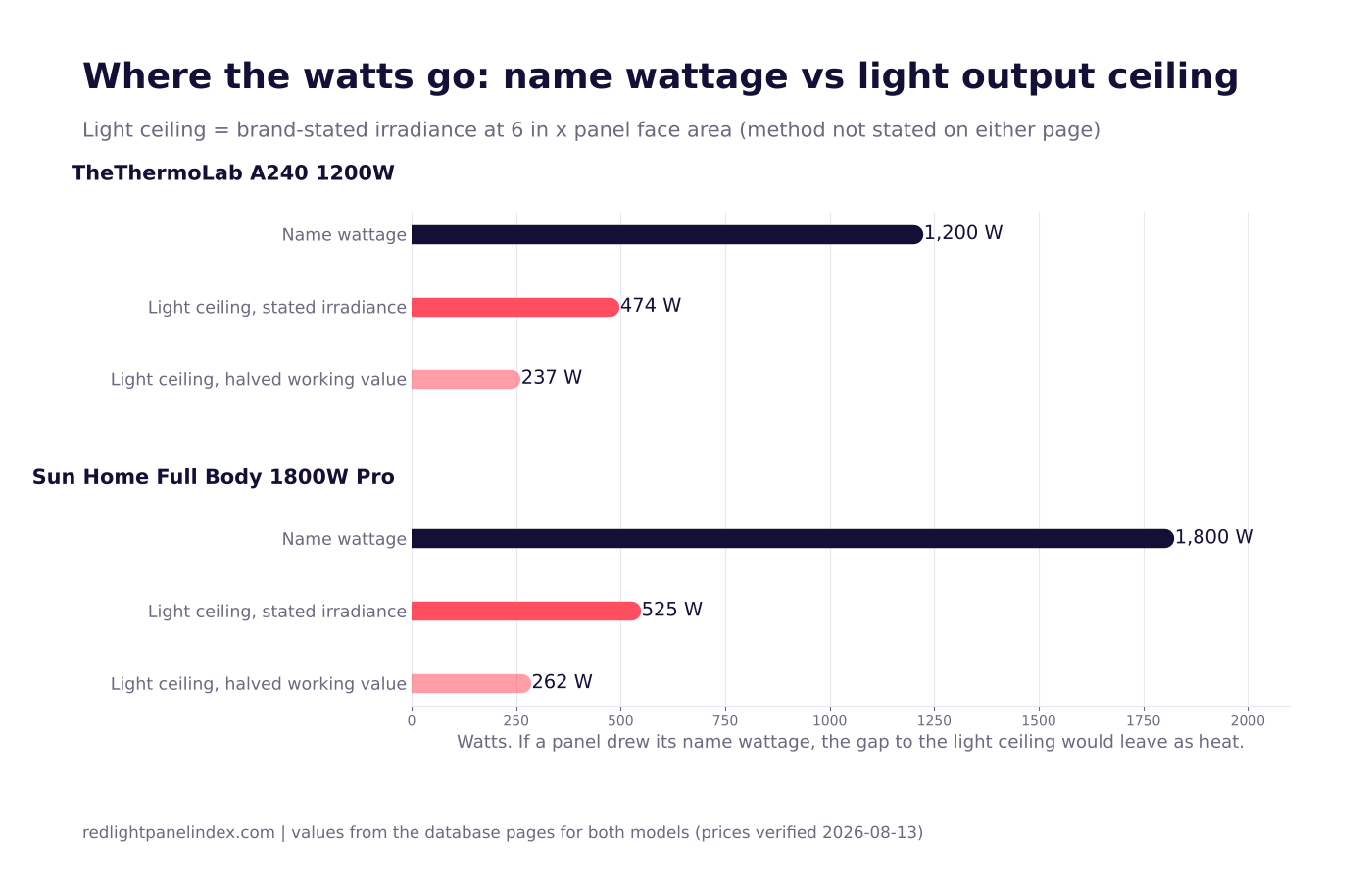
The database cannot give a heat figure directly, but it can show how large the non-light share of a panel's wattage can be. The method is the one used on the irradiance versus total power page: multiply irradiance by face area to get a ceiling on light output.
Sun Home Full Body Panel (1800W Pro). The page lists 360 LEDs (180 red, 180 near-infrared) at 5W each, which is where the 1800 comes from: a sum of LED ratings, not a measured draw. It gives a brand-stated 140 mW/cm2 at 6 inches with no method, dimensions of 91 x 41.2 cm, and a price of $1,499 (verified 2026-08-13).
- Face area: 91 x 41.2 cm is about 3,749 cm2.
- Light ceiling: 3,749 cm2 x 140 mW/cm2 is about 525,000 mW, or roughly 525 W.
- The site treats about half of an unstated-method figure as the working value. At 70 mW/cm2, the ceiling is roughly 262 W.
TheThermoLab A240 1200W. As the driver page sets out, it lists 240 LEDs and a brand-stated 180 mW/cm2 at 6 inches (method not stated) over a 94 x 28 cm face, about 2,632 cm2. That gives a light ceiling of roughly 474 W, or roughly 237 W at the halved working value. Price $855 (verified 2026-08-13).
Neither page lists a true wall draw. If either panel did draw its full name wattage, then at least 1,275 W of the Sun Home's 1,800 and at least 726 W of the TheThermoLab's 1,200 would leave as heat even at the brand-stated irradiance, and more at the working value. In practice LEDs are often run below their rating, so the real draw, and the real heat, are probably lower than these figures. The arithmetic shows the shape of the problem, not a measured heat load: a large panel has to shed hundreds of watts, which is why the biggest panels lean on fans. The dose calculator uses the irradiance side of these figures to set session length.
Mounting, room and maintenance
Cooling only works if the heat has somewhere to go. A panel pressed against a wall, inside a closed cabinet or in a small, warm room runs hotter than the same panel with space around it, and dust on fan grilles slowly cuts airflow. The cleaning and maintenance guide covers the habits, including when a grinding fan, a burning smell or a face too hot to touch means contacting the brand.
What to look for on a spec sheet
- Irradiance with a distance and a method. The output that matters is the warm one. A stated warm-up time before testing is a plus.
- Cooling type, if stated. Passive or fan-cooled. Neither is better by default; a dense, high-output panel with a fan and a modest panel with a large finned heatsink can both run cool.
- What the wattage means. A rated wall draw, a sum of LED ratings or a round number in the name. Only a rated draw tells you roughly how much heat the panel must shed.
- Warranty length. Heat shortens the life of the driver and fans as well as the LEDs, so the cover period is a better guide to durability than an hour rating. The longest warranty comparison lists the terms.
- A trial period. Noise and warmth are easiest to judge in your own room. A free trial with no restocking fee lets you check both.
What this page cannot tell you
The database holds no junction temperatures, fan-noise readings or warm-up curves for any panel, so there is no ranking here and no claim that one cooling design beats another. What can be said: heat is the price of every watt that does not become light, and a panel measured warm, mounted with space and kept clean will deliver closer to its published figures for longer.